Our First Dev Blog! 100k Messages! Latest Models! and Chat Scenarios!
J
•
Hello fellow roleplayers!
Some good news. We've been growing quite a bit in the last couple of months - and we even have our first world crossing a monumental 100k total messages sent!
We have not been idle either, and we've been cooking hard behind the scenes. If you are in our Discord server, you might have seen us posting new features here and there. But with our numbers growing, not everyone can afford the time to read every message in the Discord, so that's why we are starting a new regular blog series about all the new features that we've released and ones that we are working on.
Without further ado, welcome to our very first developer blog!
New models and model picker
As promised from our Diamond System launch, we can now provide access to the newest and most powerful models as soon as they come out, up to the maximum settings (if you choose to)! To enable this, we built a shiny new model picker!
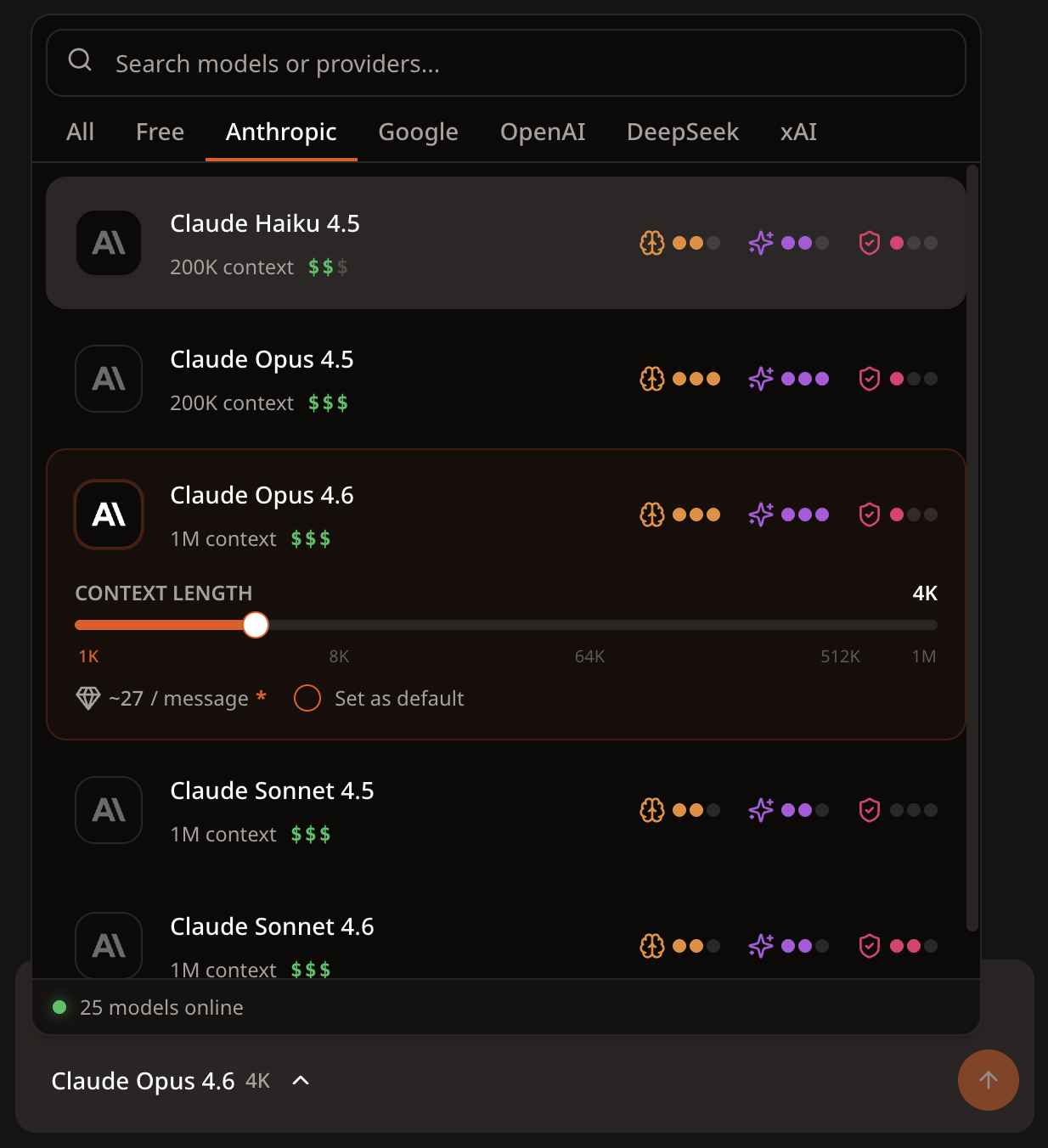
You can now push the context window size to the maximum allowed by the model. A lot of memory problems can be solved with higher context, so give it a try if you encounter character memory problems.
Our new model roster now consists of:
Anthropic
-
Claude Opus 4.6
-
Claude Sonnet 4.6
-
Claude Opus 4.5
-
Claude Sonnet 4.5
-
Claude Haiku 4.5
-
Gemini 3.1 Pro
-
Gemini 3 Flash
-
Gemini 2.5 Flash
OpenAI
-
GPT 5.4 Pro
-
GPT 5.4
-
GPT 5.2
-
GPT 5 Mini
-
GPT o4 mini
-
GPT 4o
-
GPT 4o mini
DeepSeek
- DeepSeek V3.2 (with thinking)
xAI
-
Grok 4.20 (with thinking)
-
Grok 4.1 Fast
-
Grok 4
Cost transparency
Since the Diamond System launch, we have a lot more subscribers trusting us enough to hand money to us. We appreciate that a lot! So to honor your trust, we've built a bunch of cost transparency features to make sure you know exactly where your money is going.
Improved model cost
Within our new model picker, hover or tap the estimated cost to see the model's cost:
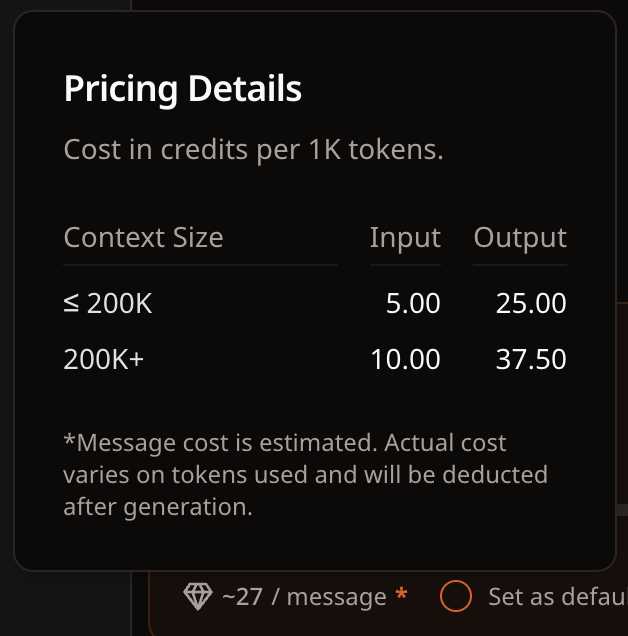
All costs are equivalent to the official API costs. This is, of course, an estimated cost. We only deduct credits when message generation is successful, based on the number of actual tokens used in the returned response.
Improved message metadata
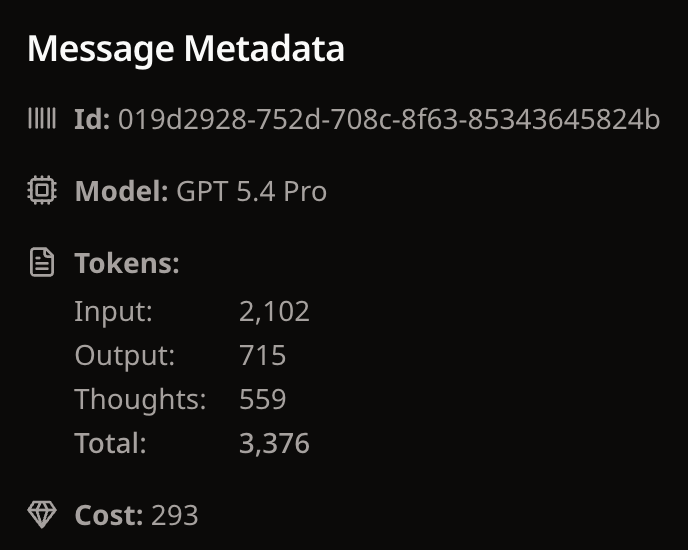
For thinking models such as Google Gemini 3.1 and GPT 5.4 Pro, we now show a separate thought token count. This counts as part of the output tokens, but it is now listed separately for clarity.
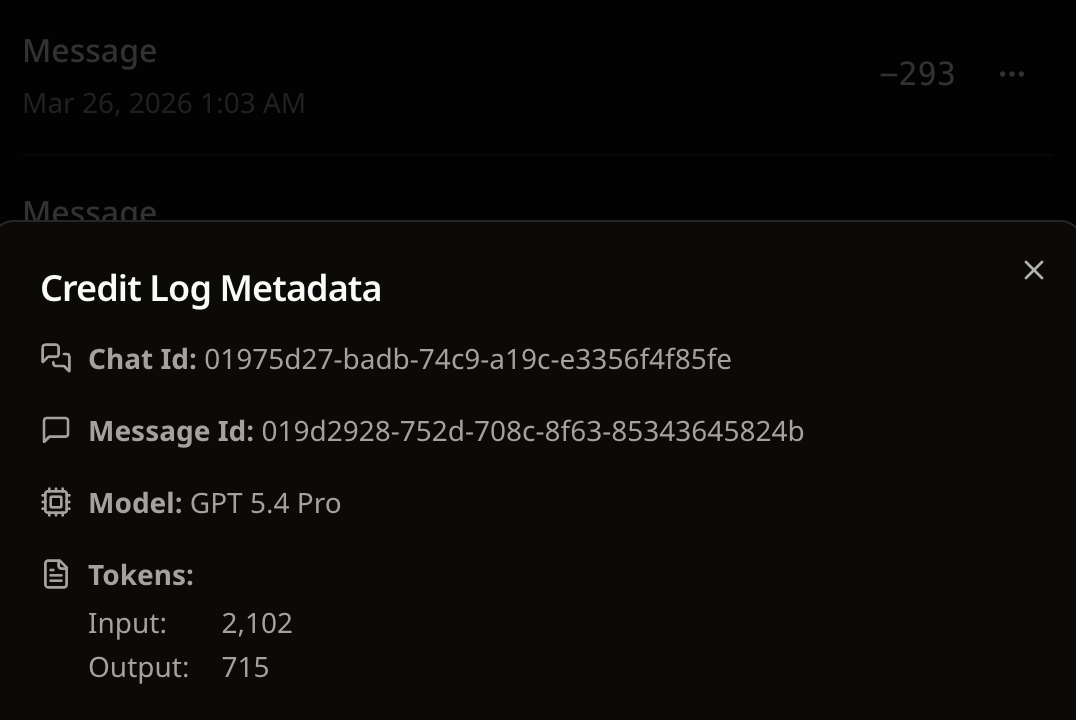
You can now view the same metadata within your Settings > Billing > Usage:
Chat features
Scenarios
We now support per-chat scenarios!
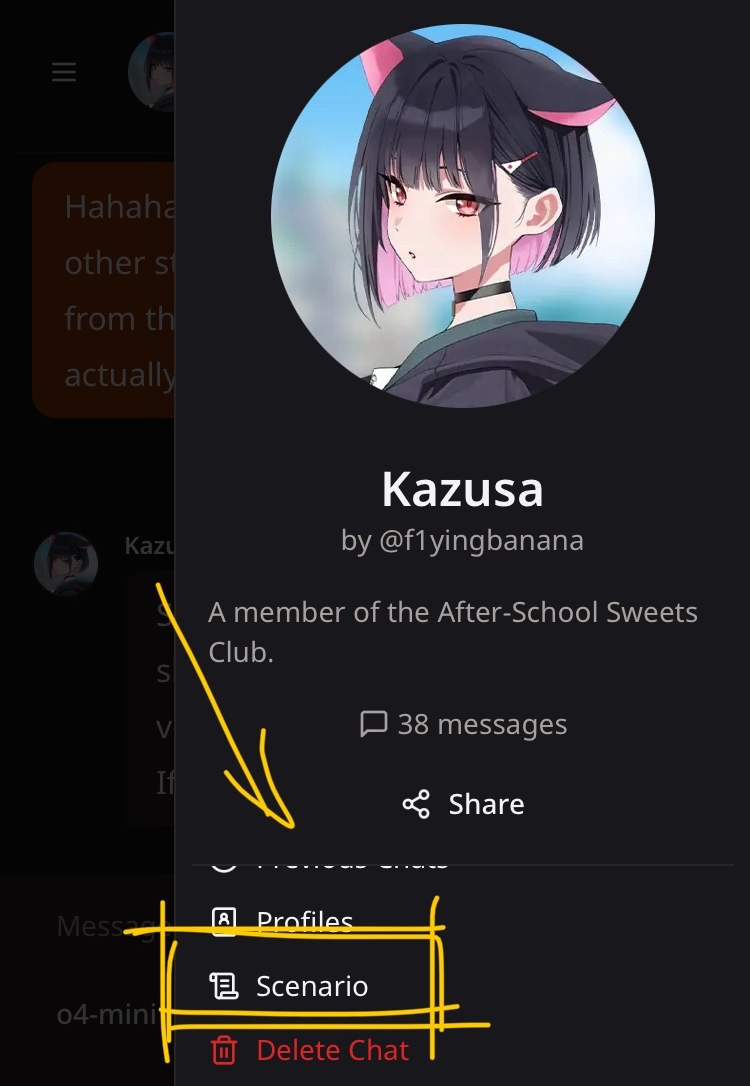
Scenarios are extra user-defined text that is directly injected into the prompt. This is great for controlling the flow of conversation - e.g. if you have a specific plot you want to explore with your character, now you can constantly remind them of it.
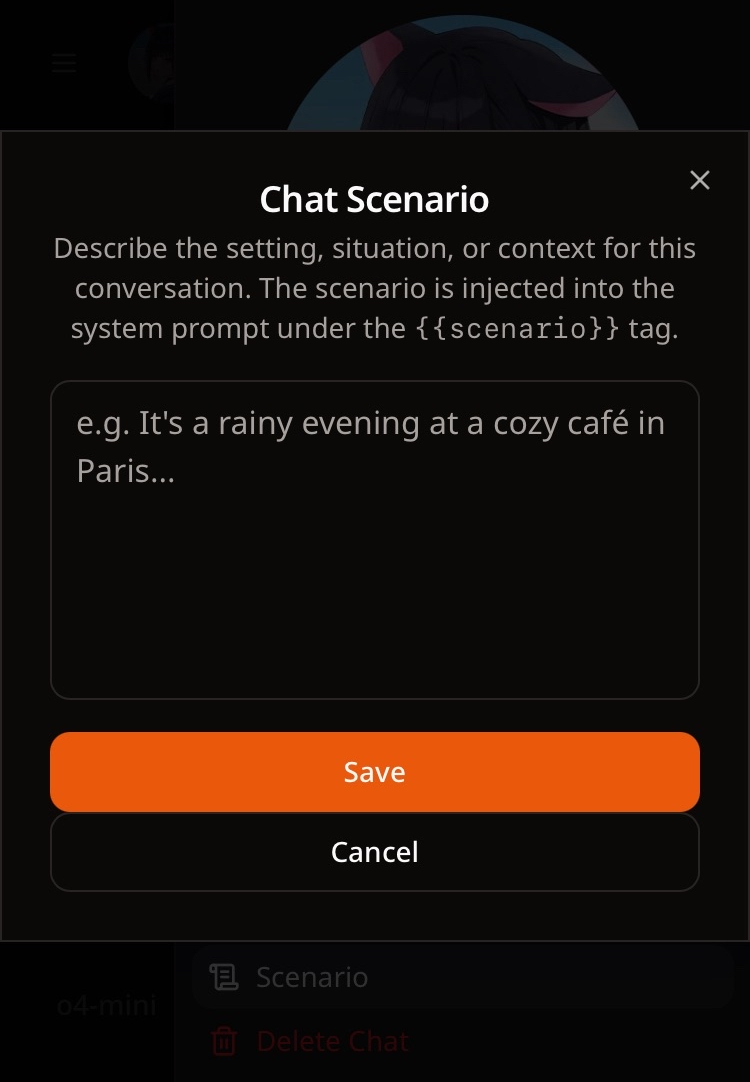
Any {{scenario}} tag in the prompt will be replaced by the text entered here. All new default prompts will contain this tag, but you might need to update older worlds manually to get the scenario working.
You can also use this to add custom instructions you'd like the AI model to follow, which we will explore below.
Clickable options
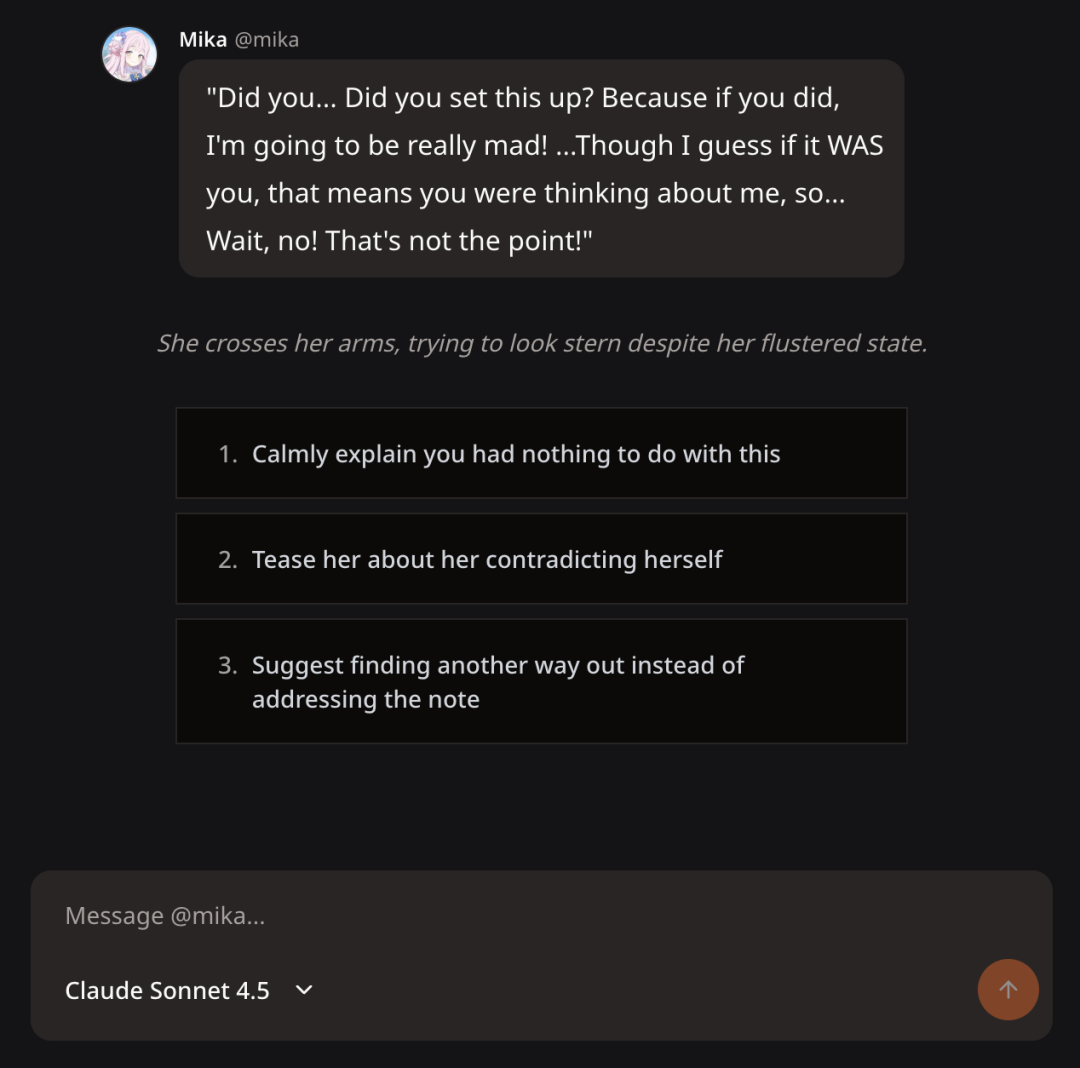
You can now get the AI to generate continue options for you. Clicking on them will send the message with that content. To enable this, you simply just need to get the AI to generate a numbered list at the end of its reply:
At the very end of your reply, generate three likely responses I will make given the situation and my personality, using a markdown numbered list. Do not write anything else after the list.
You can put this anywhere in the prompt, scenario or even your roleplay profile, and most models are good enough to pick this up.
Some models like Gemini 3 and Opus 4.6 generate brilliant options, but the older models might not be so good. If the world you are using has this option baked into the prompt and you would like to turn it off, you can try putting the following in your scenario or roleplay profile:
Ignore instructions to generate options for me. Disable generating any options at the end of the chat.
Better chat rendering
Also visible in the previous screenshot is the improved chat rendering we implemented. This feature separates stage instructions (what the character is doing) from actual dialog (what the character is saying), and puts stage instructions in gray italics at the center. This should work with the default prompt, but if for any reason the model is not outputting markdown or not using italics to output stage instructions, you can try adding this in your prompt:
Output using markdown, with stage instructions in separate paragraphs surrounded by a pair of asterisks.
World-default roleplay profiles
You can now set a default roleplay profile for a specific world, and this will take precedence over the global default profile if set. This is useful if you want to play as different characters across different worlds.
Chat settings
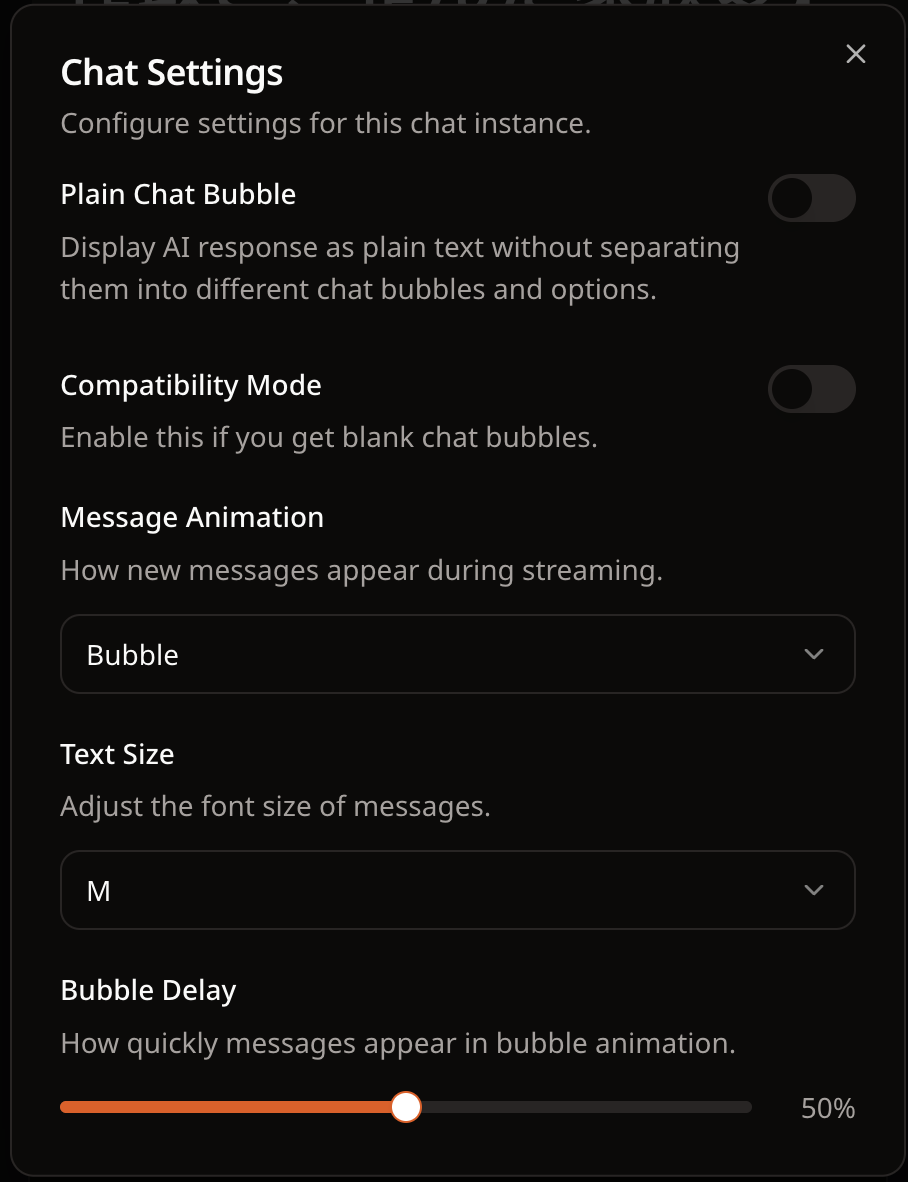
We built a settings dialog which contains several useful rendering options, including a new font size setting. You can find this in the chat sidebar alongside with the new scenario editor.
World editor features
Character-specific prompts
You can now assign characters a character-specific prompt which they will use instead of the default world prompt. This allows you to tailor prompts to each character, or just experiment with new prompts.
Navigation warning
We now display a confirmation dialog if you try to navigate away from the editor with unsaved changes.
Increased image upload limit
We increased the image upload limit for user and character avatars to 5 MB, and world banner to 10 MB.
So...what's on the radar?
While adding these features and fighting bugs, we are also working on several very exciting upcoming features.
Prompt 2.0
We are rewriting the entire prompt system to give even more flexibility for users. We are working on a visual node editor that allows you to not only chain prompts together (which is how our memory system works), but also read from the world database (e.g. fetching relevant characters or lore), writing to database (e.g. inserting multiple new messages, or even saving states such as relationship level).
The new system will also have capabilities that don't exist in other roleplaying websites yet, like running prompts on a repeated schedule - imagine scheduling your favorite character to run every morning to wake you up and talk about the latest updates on things you told them you are interested in.
Once we finish the visual editor, we will be writing sample pipelines and prompts for everyone to use with one-click - or if you fancy, you can take ours and build on it.
Voice messages
We recently acquired a grant from ElevenLabs, the industry leader in text-to-speech technology. We built a prototype message-to-voice, but the feature still needs some more polish before we release it to everyone.
Closing thoughts
That's a lot of stuff. I thought about using AI to write it, but decided against it. Kind of ironic for an AI platform! I want to express my raw gratitude for all our users, whether you are paying or not. We wouldn't be here without your support. We are looking forward to shipping more features and building the best roleplaying platform in the world!
P.S. Come find us on Discord, we almost have 1000 members!